

Registrar Boleto Depois
Esta funcionalidade permite criar um boleto e escolher quando ele deve ser registrado no banco. O boleto é gerado normalmente, mas não é enviado para registro até que você decida.
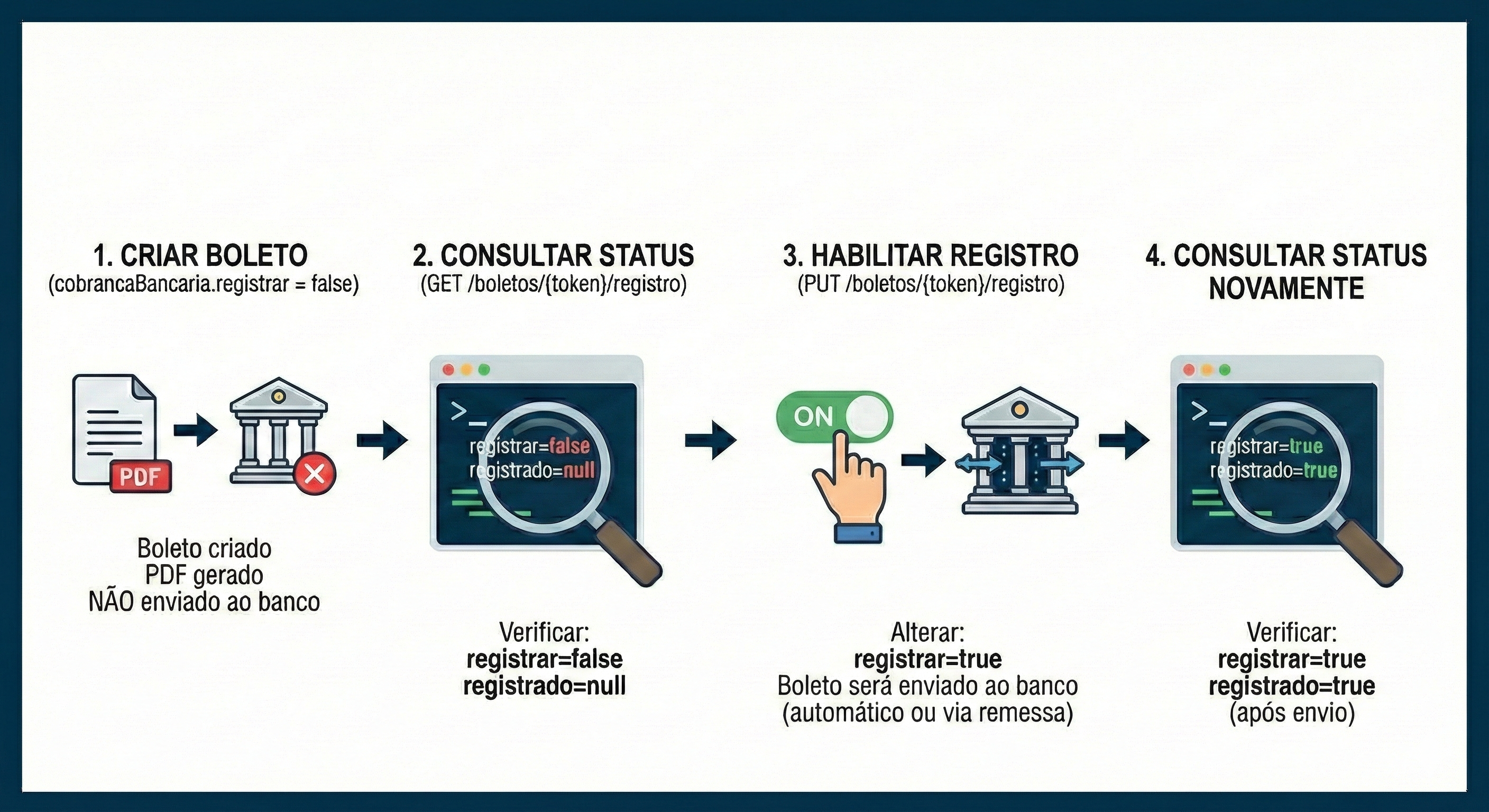
Como Funciona
Seção intitulada “Como Funciona”Ao criar um boleto com boleto.cobrancaBancaria.registrar = false:
- O boleto é criado e o PDF é gerado normalmente
- O boleto não é incluído em nenhuma remessa CNAB
- O boleto não é enviado automaticamente para o banco
- Você pode habilitar o registro posteriormente via nossa API
Quando Usar
Seção intitulada “Quando Usar”- E-commerce: Criar boleto no checkout e registrar apenas quando o cliente confirmar
- Propostas comerciais: Gerar boleto para orçamento sem custo de registro
- Distribuidoras: Imprimir boleto junto com a carga e registrar apenas após confirmação de entrega, evitando custos com devoluções
- Controle de fluxo/custos: Decidir o momento exato do registro conforme sua regra de negócio
1. Criar Boleto sem Registrar
Seção intitulada “1. Criar Boleto sem Registrar”curl -v "https://sandbox.boletocloud.com/api/v1/boletos" \ -H "Content-Type: application/x-www-form-urlencoded; charset=utf-8" \ -X "POST" \ -u "api-key_SUA-API-KEY:token" \ -d boleto.conta.token="api-key_SEU-TOKEN-DA-CONTA" \ -d boleto.cobrancaBancaria.registrar="false" \ -d boleto.emissao="2024-01-15" \ -d boleto.vencimento="2024-01-30" \ -d boleto.documento="PROP-001" \ -d boleto.titulo="DM" \ -d boleto.valor="150.00" \ -d boleto.pagador.nome="Alberto Santos Dumont" \ -d boleto.pagador.cprf="111.111.111-11" \ -d boleto.pagador.endereco.cep="36240-000" \ -d boleto.pagador.endereco.uf="MG" \ -d boleto.pagador.endereco.localidade="Santos Dumont" \ -d boleto.pagador.endereco.bairro="Centro" \ -d boleto.pagador.endereco.logradouro="Rua Principal" \ -d boleto.pagador.endereco.numero="100" \ -o boleto.pdf
# Guarde o X-BoletoCloud-Token da resposta para habilitar o registro depoisimport javax.ws.rs.client.ClientBuilder;import javax.ws.rs.client.Entity;import javax.ws.rs.core.Form;import javax.ws.rs.core.Response;import org.glassfish.jersey.client.authentication.HttpAuthenticationFeature;import java.io.InputStream;import java.nio.file.Files;import java.nio.file.Paths;import static java.nio.file.StandardCopyOption.REPLACE_EXISTING;
public class CriarBoletoSemRegistro { public static void main(String[] args) throws Exception { Form form = new Form() .param("boleto.conta.token", "api-key_SEU-TOKEN-DA-CONTA") .param("boleto.cobrancaBancaria.registrar", "false") .param("boleto.emissao", "2024-01-15") .param("boleto.vencimento", "2024-01-30") .param("boleto.documento", "PROP-001") .param("boleto.titulo", "DM") .param("boleto.valor", "150.00") .param("boleto.pagador.nome", "Alberto Santos Dumont") .param("boleto.pagador.cprf", "111.111.111-11") .param("boleto.pagador.endereco.cep", "36240-000") .param("boleto.pagador.endereco.uf", "MG") .param("boleto.pagador.endereco.localidade", "Santos Dumont") .param("boleto.pagador.endereco.bairro", "Centro") .param("boleto.pagador.endereco.logradouro", "Rua Principal") .param("boleto.pagador.endereco.numero", "100");
Response response = ClientBuilder.newClient() .target("https://sandbox.boletocloud.com/api/v1/boletos") .register(HttpAuthenticationFeature.basic("api-key_SUA-API-KEY", "token")) .request() .post(Entity.form(form));
if (response.getStatus() == 201) { String token = response.getHeaderString("X-BoletoCloud-Token"); System.out.println("Boleto criado (sem registro). Token: " + token); Files.copy(response.readEntity(InputStream.class), Paths.get("boleto.pdf"), REPLACE_EXISTING); } }}import okhttp3.*import java.io.File
fun main() { val client = OkHttpClient() val credential = Credentials.basic("api-key_SUA-API-KEY", "token")
val body = FormBody.Builder() .add("boleto.conta.token", "api-key_SEU-TOKEN-DA-CONTA") .add("boleto.cobrancaBancaria.registrar", "false") .add("boleto.emissao", "2024-01-15") .add("boleto.vencimento", "2024-01-30") .add("boleto.documento", "PROP-001") .add("boleto.titulo", "DM") .add("boleto.valor", "150.00") .add("boleto.pagador.nome", "Alberto Santos Dumont") .add("boleto.pagador.cprf", "111.111.111-11") .add("boleto.pagador.endereco.cep", "36240-000") .add("boleto.pagador.endereco.uf", "MG") .add("boleto.pagador.endereco.localidade", "Santos Dumont") .add("boleto.pagador.endereco.bairro", "Centro") .add("boleto.pagador.endereco.logradouro", "Rua Principal") .add("boleto.pagador.endereco.numero", "100") .build()
val request = Request.Builder() .url("https://sandbox.boletocloud.com/api/v1/boletos") .header("Authorization", credential) .post(body) .build()
client.newCall(request).execute().use { response -> if (response.code == 201) { val token = response.header("X-BoletoCloud-Token") println("Boleto criado (sem registro). Token: $token") File("boleto.pdf").writeBytes(response.body!!.bytes()) } }}using System;using System.Collections.Generic;using System.IO;using System.Linq;using System.Net.Http;using System.Net.Http.Headers;using System.Text;using System.Threading.Tasks;
class Program { static async Task Main(string[] args) { using var client = new HttpClient(); var credentials = Convert.ToBase64String( Encoding.ASCII.GetBytes("api-key_SUA-API-KEY:token")); client.DefaultRequestHeaders.Authorization = new AuthenticationHeaderValue("Basic", credentials);
var content = new FormUrlEncodedContent(new Dictionary<string, string> { {"boleto.conta.token", "api-key_SEU-TOKEN-DA-CONTA"}, {"boleto.cobrancaBancaria.registrar", "false"}, {"boleto.emissao", "2024-01-15"}, {"boleto.vencimento", "2024-01-30"}, {"boleto.documento", "PROP-001"}, {"boleto.titulo", "DM"}, {"boleto.valor", "150.00"}, {"boleto.pagador.nome", "Alberto Santos Dumont"}, {"boleto.pagador.cprf", "111.111.111-11"}, {"boleto.pagador.endereco.cep", "36240-000"}, {"boleto.pagador.endereco.uf", "MG"}, {"boleto.pagador.endereco.localidade", "Santos Dumont"}, {"boleto.pagador.endereco.bairro", "Centro"}, {"boleto.pagador.endereco.logradouro", "Rua Principal"}, {"boleto.pagador.endereco.numero", "100"} });
var response = await client.PostAsync( "https://sandbox.boletocloud.com/api/v1/boletos", content);
if ((int)response.StatusCode == 201) { var token = response.Headers.GetValues("X-BoletoCloud-Token").First(); Console.WriteLine($"Boleto criado (sem registro). Token: {token}"); var pdf = await response.Content.ReadAsByteArrayAsync(); await File.WriteAllBytesAsync("boleto.pdf", pdf); } }}const https = require('https');const fs = require('fs');const querystring = require('querystring');
const data = querystring.stringify({ 'boleto.conta.token': 'api-key_SEU-TOKEN-DA-CONTA', 'boleto.cobrancaBancaria.registrar': 'false', 'boleto.emissao': '2024-01-15', 'boleto.vencimento': '2024-01-30', 'boleto.documento': 'PROP-001', 'boleto.titulo': 'DM', 'boleto.valor': '150.00', 'boleto.pagador.nome': 'Alberto Santos Dumont', 'boleto.pagador.cprf': '111.111.111-11', 'boleto.pagador.endereco.cep': '36240-000', 'boleto.pagador.endereco.uf': 'MG', 'boleto.pagador.endereco.localidade': 'Santos Dumont', 'boleto.pagador.endereco.bairro': 'Centro', 'boleto.pagador.endereco.logradouro': 'Rua Principal', 'boleto.pagador.endereco.numero': '100'});
const options = { hostname: 'sandbox.boletocloud.com', path: '/api/v1/boletos', method: 'POST', auth: 'api-key_SUA-API-KEY:token', headers: { 'Content-Type': 'application/x-www-form-urlencoded', 'Content-Length': Buffer.byteLength(data) }};
const req = https.request(options, (res) => { if (res.statusCode === 201) { const token = res.headers['x-boletocloud-token']; console.log('Boleto criado (sem registro). Token:', token); const file = fs.createWriteStream('boleto.pdf'); res.pipe(file); }});
req.write(data);req.end();package main
import ( "fmt" "io" "net/http" "net/url" "os" "strings")
func main() { data := url.Values{ "boleto.conta.token": {"api-key_SEU-TOKEN-DA-CONTA"}, "boleto.cobrancaBancaria.registrar": {"false"}, "boleto.emissao": {"2024-01-15"}, "boleto.vencimento": {"2024-01-30"}, "boleto.documento": {"PROP-001"}, "boleto.titulo": {"DM"}, "boleto.valor": {"150.00"}, "boleto.pagador.nome": {"Alberto Santos Dumont"}, "boleto.pagador.cprf": {"111.111.111-11"}, "boleto.pagador.endereco.cep": {"36240-000"}, "boleto.pagador.endereco.uf": {"MG"}, "boleto.pagador.endereco.localidade": {"Santos Dumont"}, "boleto.pagador.endereco.bairro": {"Centro"}, "boleto.pagador.endereco.logradouro": {"Rua Principal"}, "boleto.pagador.endereco.numero": {"100"}, }
req, _ := http.NewRequest("POST", "https://sandbox.boletocloud.com/api/v1/boletos", strings.NewReader(data.Encode())) req.SetBasicAuth("api-key_SUA-API-KEY", "token") req.Header.Set("Content-Type", "application/x-www-form-urlencoded")
resp, err := http.DefaultClient.Do(req) if err != nil { panic(err) } defer resp.Body.Close()
if resp.StatusCode == 201 { token := resp.Header.Get("X-BoletoCloud-Token") fmt.Println("Boleto criado (sem registro). Token:", token) file, _ := os.Create("boleto.pdf") defer file.Close() io.Copy(file, resp.Body) }}<?php$url = 'https://sandbox.boletocloud.com/api/v1/boletos';$api_key = 'api-key_SUA-API-KEY';
$data = http_build_query([ 'boleto.conta.token' => 'api-key_SEU-TOKEN-DA-CONTA', 'boleto.cobrancaBancaria.registrar' => 'false', 'boleto.emissao' => '2024-01-15', 'boleto.vencimento' => '2024-01-30', 'boleto.documento' => 'PROP-001', 'boleto.titulo' => 'DM', 'boleto.valor' => '150.00', 'boleto.pagador.nome' => 'Alberto Santos Dumont', 'boleto.pagador.cprf' => '111.111.111-11', 'boleto.pagador.endereco.cep' => '36240-000', 'boleto.pagador.endereco.uf' => 'MG', 'boleto.pagador.endereco.localidade' => 'Santos Dumont', 'boleto.pagador.endereco.bairro' => 'Centro', 'boleto.pagador.endereco.logradouro' => 'Rua Principal', 'boleto.pagador.endereco.numero' => '100']);
$ch = curl_init();curl_setopt($ch, CURLOPT_URL, $url);curl_setopt($ch, CURLOPT_POST, true);curl_setopt($ch, CURLOPT_POSTFIELDS, $data);curl_setopt($ch, CURLOPT_HTTPAUTH, CURLAUTH_BASIC);curl_setopt($ch, CURLOPT_USERPWD, "$api_key:token");curl_setopt($ch, CURLOPT_RETURNTRANSFER, true);curl_setopt($ch, CURLOPT_HEADER, true);
$response = curl_exec($ch);$http_code = curl_getinfo($ch, CURLINFO_HTTP_CODE);$header_size = curl_getinfo($ch, CURLINFO_HEADER_SIZE);$headers = substr($response, 0, $header_size);$body = substr($response, $header_size);curl_close($ch);
if ($http_code == 201) { preg_match('/X-BoletoCloud-Token:\s*(.+)/i', $headers, $match); $token = trim($match[1] ?? ''); echo "Boleto criado (sem registro). Token: $token\n"; file_put_contents('boleto.pdf', $body);}?>import requestsfrom requests.auth import HTTPBasicAuth
response = requests.post( 'https://sandbox.boletocloud.com/api/v1/boletos', auth=HTTPBasicAuth('api-key_SUA-API-KEY', 'token'), data={ 'boleto.conta.token': 'api-key_SEU-TOKEN-DA-CONTA', 'boleto.cobrancaBancaria.registrar': 'false', 'boleto.emissao': '2024-01-15', 'boleto.vencimento': '2024-01-30', 'boleto.documento': 'PROP-001', 'boleto.titulo': 'DM', 'boleto.valor': '150.00', 'boleto.pagador.nome': 'Alberto Santos Dumont', 'boleto.pagador.cprf': '111.111.111-11', 'boleto.pagador.endereco.cep': '36240-000', 'boleto.pagador.endereco.uf': 'MG', 'boleto.pagador.endereco.localidade': 'Santos Dumont', 'boleto.pagador.endereco.bairro': 'Centro', 'boleto.pagador.endereco.logradouro': 'Rua Principal', 'boleto.pagador.endereco.numero': '100' })
if response.status_code == 201: token = response.headers.get('X-BoletoCloud-Token') print(f'Boleto criado (sem registro). Token: {token}') with open('boleto.pdf', 'wb') as f: f.write(response.content)require 'net/http'require 'uri'
uri = URI('https://sandbox.boletocloud.com/api/v1/boletos')
Net::HTTP.start(uri.host, uri.port, use_ssl: true) do |http| request = Net::HTTP::Post.new(uri) request.basic_auth('api-key_SUA-API-KEY', 'token') request.set_form_data( 'boleto.conta.token' => 'api-key_SEU-TOKEN-DA-CONTA', 'boleto.cobrancaBancaria.registrar' => 'false', 'boleto.emissao' => '2024-01-15', 'boleto.vencimento' => '2024-01-30', 'boleto.documento' => 'PROP-001', 'boleto.titulo' => 'DM', 'boleto.valor' => '150.00', 'boleto.pagador.nome' => 'Alberto Santos Dumont', 'boleto.pagador.cprf' => '111.111.111-11', 'boleto.pagador.endereco.cep' => '36240-000', 'boleto.pagador.endereco.uf' => 'MG', 'boleto.pagador.endereco.localidade' => 'Santos Dumont', 'boleto.pagador.endereco.bairro' => 'Centro', 'boleto.pagador.endereco.logradouro' => 'Rua Principal', 'boleto.pagador.endereco.numero' => '100' )
response = http.request(request) if response.code == '201' token = response['X-BoletoCloud-Token'] puts "Boleto criado (sem registro). Token: #{token}" File.write('boleto.pdf', response.body) endend(require '[clj-http.client :as client])
(let [response (client/post "https://sandbox.boletocloud.com/api/v1/boletos" {:basic-auth ["api-key_SUA-API-KEY" "token"] :form-params {:boleto.conta.token "api-key_SEU-TOKEN-DA-CONTA" :boleto.cobrancaBancaria.registrar "false" :boleto.emissao "2024-01-15" :boleto.vencimento "2024-01-30" :boleto.documento "PROP-001" :boleto.titulo "DM" :boleto.valor "150.00" :boleto.pagador.nome "Alberto Santos Dumont" :boleto.pagador.cprf "111.111.111-11" :boleto.pagador.endereco.cep "36240-000" :boleto.pagador.endereco.uf "MG" :boleto.pagador.endereco.localidade "Santos Dumont" :boleto.pagador.endereco.bairro "Centro" :boleto.pagador.endereco.logradouro "Rua Principal" :boleto.pagador.endereco.numero "100"} :as :byte-array :throw-exceptions false})] (when (= 201 (:status response)) (let [token (get-in response [:headers "X-BoletoCloud-Token"])] (println "Boleto criado (sem registro). Token:" token) (clojure.java.io/copy (:body response) (clojure.java.io/file "boleto.pdf")))))2. Consultar Status do Registro
Seção intitulada “2. Consultar Status do Registro”Verifique se o boleto está marcado para registro, se já foi registrado ou se houve erro.
curl "https://sandbox.boletocloud.com/api/v1/boletos/{token_do_boleto}/registro" \ -u "api-key_SUA-API-KEY:token" \ -H "Content-Type: application/json"Response response = ClientBuilder.newClient() .target("https://sandbox.boletocloud.com/api/v1/boletos/{token_do_boleto}/registro") .register(HttpAuthenticationFeature.basic("api-key_SUA-API-KEY", "token")) .request(MediaType.APPLICATION_JSON) .get();
System.out.println(response.readEntity(String.class));val client = OkHttpClient()val credential = Credentials.basic("api-key_SUA-API-KEY", "token")
val request = Request.Builder() .url("https://sandbox.boletocloud.com/api/v1/boletos/{token_do_boleto}/registro") .header("Authorization", credential) .header("Content-Type", "application/json") .get() .build()
client.newCall(request).execute().use { response -> println(response.body?.string())}using var client = new HttpClient();var credentials = Convert.ToBase64String( Encoding.ASCII.GetBytes("api-key_SUA-API-KEY:token"));client.DefaultRequestHeaders.Authorization = new AuthenticationHeaderValue("Basic", credentials);
var response = await client.GetAsync( "https://sandbox.boletocloud.com/api/v1/boletos/{token_do_boleto}/registro");var body = await response.Content.ReadAsStringAsync();Console.WriteLine(body);const https = require('https');
const options = { hostname: 'sandbox.boletocloud.com', path: '/api/v1/boletos/{token_do_boleto}/registro', method: 'GET', auth: 'api-key_SUA-API-KEY:token', headers: { 'Content-Type': 'application/json' }};
https.request(options, (res) => { let body = ''; res.on('data', chunk => body += chunk); res.on('end', () => console.log(JSON.parse(body)));}).end();req, _ := http.NewRequest("GET", "https://sandbox.boletocloud.com/api/v1/boletos/{token_do_boleto}/registro", nil)req.SetBasicAuth("api-key_SUA-API-KEY", "token")req.Header.Set("Content-Type", "application/json")
resp, _ := http.DefaultClient.Do(req)defer resp.Body.Close()body, _ := io.ReadAll(resp.Body)fmt.Println(string(body))<?php$ch = curl_init();curl_setopt($ch, CURLOPT_URL, 'https://sandbox.boletocloud.com/api/v1/boletos/{token_do_boleto}/registro');curl_setopt($ch, CURLOPT_HTTPAUTH, CURLAUTH_BASIC);curl_setopt($ch, CURLOPT_USERPWD, 'api-key_SUA-API-KEY:token');curl_setopt($ch, CURLOPT_RETURNTRANSFER, true);curl_setopt($ch, CURLOPT_HTTPHEADER, ['Content-Type: application/json']);
$response = curl_exec($ch);curl_close($ch);echo $response;?>import requestsfrom requests.auth import HTTPBasicAuth
response = requests.get( 'https://sandbox.boletocloud.com/api/v1/boletos/{token_do_boleto}/registro', auth=HTTPBasicAuth('api-key_SUA-API-KEY', 'token'), headers={'Content-Type': 'application/json'})
print(response.json())require 'net/http'require 'uri'require 'json'
uri = URI('https://sandbox.boletocloud.com/api/v1/boletos/{token_do_boleto}/registro')
Net::HTTP.start(uri.host, uri.port, use_ssl: true) do |http| request = Net::HTTP::Get.new(uri) request.basic_auth('api-key_SUA-API-KEY', 'token') request['Content-Type'] = 'application/json'
response = http.request(request) puts JSON.parse(response.body)end(require '[clj-http.client :as client])
(let [response (client/get "https://sandbox.boletocloud.com/api/v1/boletos/{token_do_boleto}/registro" {:basic-auth ["api-key_SUA-API-KEY" "token"] :headers {"Content-Type" "application/json"} :as :json})] (println (:body response)))Resposta
Seção intitulada “Resposta”{ "status": { "token": "token_do_boleto", "registrar": false, "registrado": null, "erro": null }}| Campo | Descrição |
|---|---|
registrar |
true = marcado para registrar, false = não será registrado |
registrado |
true = já registrado no banco, null = ainda não registrado |
erro |
Mensagem de erro caso o registro tenha falhado |
3. Habilitar o Registro
Seção intitulada “3. Habilitar o Registro”Quando decidir que o boleto deve ser registrado, altere o campo via API. O boleto será incluído na próxima remessa ou enviado automaticamente ao banco.
curl -X PUT "https://sandbox.boletocloud.com/api/v1/boletos/{token_do_boleto}/registro" \ -u "api-key_SUA-API-KEY:token" \ -H "Content-Type: application/json" \ -d '{"boleto":{"cobrancaBancaria":{"registrar":true}}}'Response response = ClientBuilder.newClient() .target("https://sandbox.boletocloud.com/api/v1/boletos/{token_do_boleto}/registro") .register(HttpAuthenticationFeature.basic("api-key_SUA-API-KEY", "token")) .request(MediaType.APPLICATION_JSON) .put(Entity.json("{\"boleto\":{\"cobrancaBancaria\":{\"registrar\":true}}}"));
if (response.getStatus() == 200) { System.out.println("Boleto habilitado para registro!");}val client = OkHttpClient()val credential = Credentials.basic("api-key_SUA-API-KEY", "token")val json = """{"boleto":{"cobrancaBancaria":{"registrar":true}}}"""
val body = json.toRequestBody("application/json".toMediaType())
val request = Request.Builder() .url("https://sandbox.boletocloud.com/api/v1/boletos/{token_do_boleto}/registro") .header("Authorization", credential) .put(body) .build()
client.newCall(request).execute().use { response -> if (response.code == 200) println("Boleto habilitado para registro!")}using var client = new HttpClient();var credentials = Convert.ToBase64String( Encoding.ASCII.GetBytes("api-key_SUA-API-KEY:token"));client.DefaultRequestHeaders.Authorization = new AuthenticationHeaderValue("Basic", credentials);
var json = new StringContent( "{\"boleto\":{\"cobrancaBancaria\":{\"registrar\":true}}}", Encoding.UTF8, "application/json");
var response = await client.PutAsync( "https://sandbox.boletocloud.com/api/v1/boletos/{token_do_boleto}/registro", json);
if ((int)response.StatusCode == 200) Console.WriteLine("Boleto habilitado para registro!");const https = require('https');
const data = JSON.stringify({ boleto: { cobrancaBancaria: { registrar: true } }});
const options = { hostname: 'sandbox.boletocloud.com', path: '/api/v1/boletos/{token_do_boleto}/registro', method: 'PUT', auth: 'api-key_SUA-API-KEY:token', headers: { 'Content-Type': 'application/json', 'Content-Length': Buffer.byteLength(data) }};
const req = https.request(options, (res) => { if (res.statusCode === 200) console.log('Boleto habilitado para registro!');});
req.write(data);req.end();json := `{"boleto":{"cobrancaBancaria":{"registrar":true}}}`
req, _ := http.NewRequest("PUT", "https://sandbox.boletocloud.com/api/v1/boletos/{token_do_boleto}/registro", strings.NewReader(json))req.SetBasicAuth("api-key_SUA-API-KEY", "token")req.Header.Set("Content-Type", "application/json")
resp, _ := http.DefaultClient.Do(req)defer resp.Body.Close()
if resp.StatusCode == 200 { fmt.Println("Boleto habilitado para registro!")}<?php$ch = curl_init();curl_setopt($ch, CURLOPT_URL, 'https://sandbox.boletocloud.com/api/v1/boletos/{token_do_boleto}/registro');curl_setopt($ch, CURLOPT_CUSTOMREQUEST, 'PUT');curl_setopt($ch, CURLOPT_POSTFIELDS, '{"boleto":{"cobrancaBancaria":{"registrar":true}}}');curl_setopt($ch, CURLOPT_HTTPAUTH, CURLAUTH_BASIC);curl_setopt($ch, CURLOPT_USERPWD, 'api-key_SUA-API-KEY:token');curl_setopt($ch, CURLOPT_RETURNTRANSFER, true);curl_setopt($ch, CURLOPT_HTTPHEADER, ['Content-Type: application/json']);
$response = curl_exec($ch);$http_code = curl_getinfo($ch, CURLINFO_HTTP_CODE);curl_close($ch);
if ($http_code == 200) echo "Boleto habilitado para registro!\n";?>import requestsfrom requests.auth import HTTPBasicAuth
response = requests.put( 'https://sandbox.boletocloud.com/api/v1/boletos/{token_do_boleto}/registro', auth=HTTPBasicAuth('api-key_SUA-API-KEY', 'token'), headers={'Content-Type': 'application/json'}, json={'boleto': {'cobrancaBancaria': {'registrar': True}}})
if response.status_code == 200: print('Boleto habilitado para registro!')require 'net/http'require 'uri'require 'json'
uri = URI('https://sandbox.boletocloud.com/api/v1/boletos/{token_do_boleto}/registro')
Net::HTTP.start(uri.host, uri.port, use_ssl: true) do |http| request = Net::HTTP::Put.new(uri) request.basic_auth('api-key_SUA-API-KEY', 'token') request['Content-Type'] = 'application/json' request.body = { boleto: { cobrancaBancaria: { registrar: true } } }.to_json
response = http.request(request) puts 'Boleto habilitado para registro!' if response.code == '200'end(require '[clj-http.client :as client])
(let [response (client/put "https://sandbox.boletocloud.com/api/v1/boletos/{token_do_boleto}/registro" {:basic-auth ["api-key_SUA-API-KEY" "token"] :content-type :json :body "{\"boleto\":{\"cobrancaBancaria\":{\"registrar\":true}}}" :throw-exceptions false})] (when (= 200 (:status response)) (println "Boleto habilitado para registro!")))Resposta
Seção intitulada “Resposta”HTTP/1.1 200 OKFluxo Completo
Seção intitulada “Fluxo Completo”┌─────────────────────────────────────────────────────────────────────┐│ 1. CRIAR BOLETO (cobrancaBancaria.registrar = false) ││ └──► Boleto criado, PDF gerado, NÃO enviado ao banco ││ ││ 2. CONSULTAR STATUS (GET /boletos/{token}/registro) ││ └──► Verificar: registrar=false, registrado=null ││ ││ 3. HABILITAR REGISTRO (PUT /boletos/{token}/registro) ││ └──► Alterar: registrar=true ││ └──► Boleto será enviado ao banco (automático ou via remessa) ││ ││ 4. CONSULTAR STATUS NOVAMENTE ││ └──► Verificar: registrar=true, registrado=true (após envio) ││ │└─────────────────────────────────────────────────────────────────────┘Veja Também
Seção intitulada “Veja Também”Obter Status do RegistroEndpoint de consulta de status
Boleto PropostaCasos de uso para boletos não registrados
Arquivos CNABGeração de remessas
Alterar RegistroHabilitar boleto para registro