

Registrar Boleto Depois
Esta funcionalidade permite criar um boleto e escolher quando ele deve ser registrado no banco. O boleto é gerado normalmente, mas não é enviado para registro até que você decida.
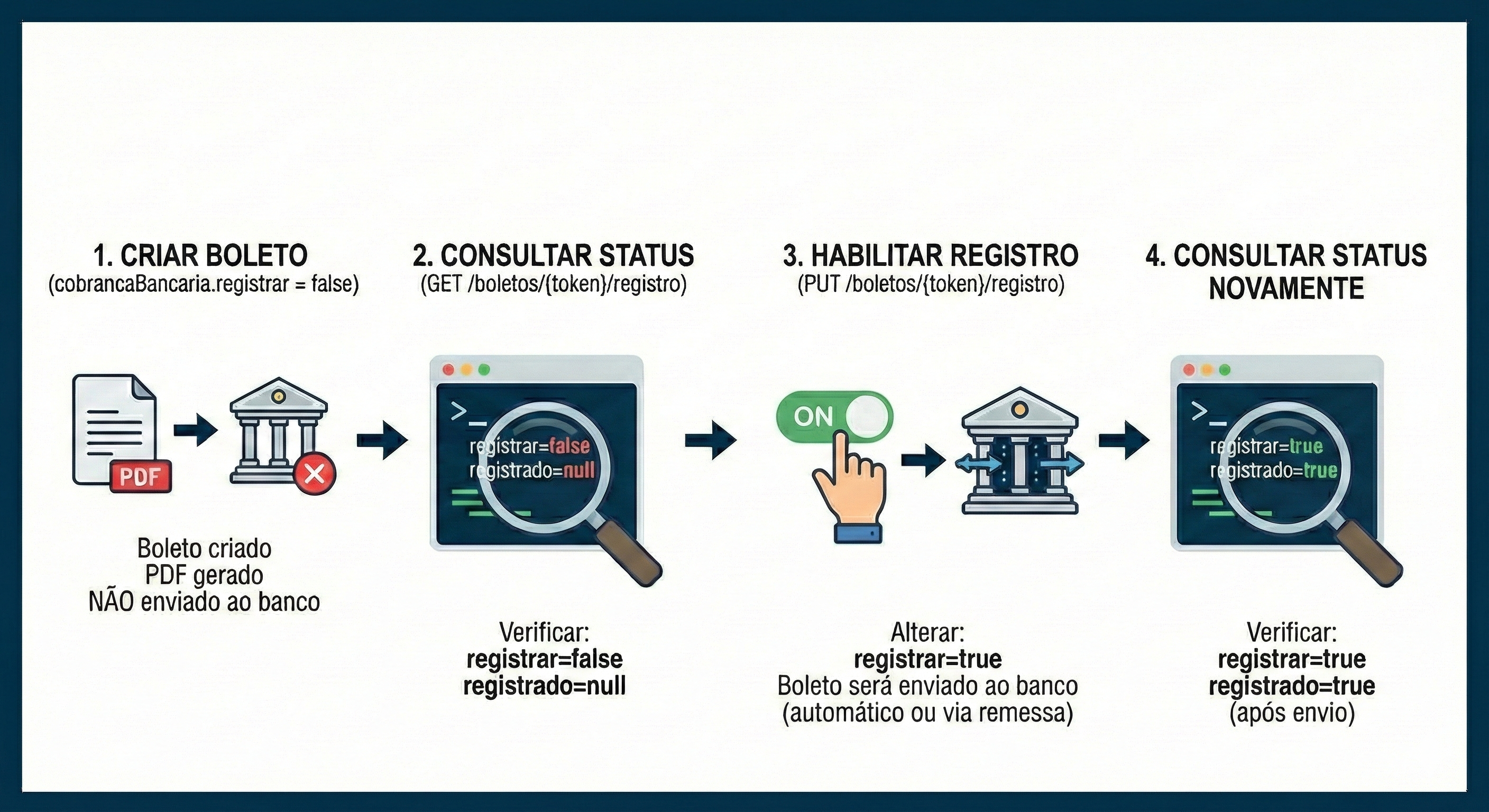
Como Funciona
Seção intitulada “Como Funciona”Ao criar um boleto com boleto.cobrancaBancaria.registrar = false:
- O boleto é criado e o PDF é gerado normalmente
- O boleto não é incluído em nenhuma remessa CNAB
- O boleto não é enviado automaticamente para o banco
- Você pode habilitar o registro posteriormente via nossa API
Quando Usar
Seção intitulada “Quando Usar”- E-commerce: Criar boleto no checkout e registrar apenas quando o cliente confirmar
- Propostas comerciais: Gerar boleto para orçamento sem custo de registro
- Distribuidoras: Imprimir boleto junto com a carga e registrar apenas após confirmação de entrega, evitando custos com devoluções
- Controle de fluxo/custos: Decidir o momento exato do registro conforme sua regra de negócio
1. Criar Boleto sem Registrar
Seção intitulada “1. Criar Boleto sem Registrar”curl -v "https://sandbox.boletocloud.com/api/v1/boletos" \ -H "Content-Type: application/x-www-form-urlencoded; charset=utf-8" \ -X "POST" \ -u "api-key_SUA-API-KEY:token" \ -d boleto.conta.token="api-key_SEU-TOKEN-DA-CONTA" \ -d boleto.cobrancaBancaria.registrar="false" \ -d boleto.emissao="2024-01-15" \ -d boleto.vencimento="2024-01-30" \ -d boleto.documento="PROP-001" \ -d boleto.titulo="DM" \ -d boleto.valor="150.00" \ -d boleto.pagador.nome="Alberto Santos Dumont" \ -d boleto.pagador.cprf="111.111.111-11" \ -d boleto.pagador.endereco.cep="36240-000" \ -d boleto.pagador.endereco.uf="MG" \ -d boleto.pagador.endereco.localidade="Santos Dumont" \ -d boleto.pagador.endereco.bairro="Centro" \ -d boleto.pagador.endereco.logradouro="Rua Principal" \ -d boleto.pagador.endereco.numero="100" \ -o boleto.pdf
# Guarde o X-BoletoCloud-Token da resposta para habilitar o registro depoisimport javax.ws.rs.client.ClientBuilder;import javax.ws.rs.client.Entity;import javax.ws.rs.core.Form;import javax.ws.rs.core.Response;import org.glassfish.jersey.client.authentication.HttpAuthenticationFeature;import java.io.InputStream;import java.nio.file.Files;import java.nio.file.Paths;import static java.nio.file.StandardCopyOption.REPLACE_EXISTING;
public class CriarBoletoSemRegistro { public static void main(String[] args) throws Exception { Form form = new Form() .param("boleto.conta.token", "api-key_SEU-TOKEN-DA-CONTA") .param("boleto.cobrancaBancaria.registrar", "false") .param("boleto.emissao", "2024-01-15") .param("boleto.vencimento", "2024-01-30") .param("boleto.documento", "PROP-001") .param("boleto.titulo", "DM") .param("boleto.valor", "150.00") .param("boleto.pagador.nome", "Alberto Santos Dumont") .param("boleto.pagador.cprf", "111.111.111-11") .param("boleto.pagador.endereco.cep", "36240-000") .param("boleto.pagador.endereco.uf", "MG") .param("boleto.pagador.endereco.localidade", "Santos Dumont") .param("boleto.pagador.endereco.bairro", "Centro") .param("boleto.pagador.endereco.logradouro", "Rua Principal") .param("boleto.pagador.endereco.numero", "100");
Response response = ClientBuilder.newClient() .target("https://sandbox.boletocloud.com/api/v1/boletos") .register(HttpAuthenticationFeature.basic("api-key_SUA-API-KEY", "token")) .request() .post(Entity.form(form));
if (response.getStatus() == 201) { String token = response.getHeaderString("X-BoletoCloud-Token"); System.out.println("Boleto criado (sem registro). Token: " + token); Files.copy(response.readEntity(InputStream.class), Paths.get("boleto.pdf"), REPLACE_EXISTING); } }}import okhttp3.*import java.io.File
fun main() { val client = OkHttpClient() val credential = Credentials.basic("api-key_SUA-API-KEY", "token")
val body = FormBody.Builder() .add("boleto.conta.token", "api-key_SEU-TOKEN-DA-CONTA") .add("boleto.cobrancaBancaria.registrar", "false") .add("boleto.emissao", "2024-01-15") .add("boleto.vencimento", "2024-01-30") .add("boleto.documento", "PROP-001") .add("boleto.titulo", "DM") .add("boleto.valor", "150.00") .add("boleto.pagador.nome", "Alberto Santos Dumont") .add("boleto.pagador.cprf", "111.111.111-11") .add("boleto.pagador.endereco.cep", "36240-000") .add("boleto.pagador.endereco.uf", "MG") .add("boleto.pagador.endereco.localidade", "Santos Dumont") .add("boleto.pagador.endereco.bairro", "Centro") .add("boleto.pagador.endereco.logradouro", "Rua Principal") .add("boleto.pagador.endereco.numero", "100") .build()
val request = Request.Builder() .url("https://sandbox.boletocloud.com/api/v1/boletos") .header("Authorization", credential) .post(body) .build()
client.newCall(request).execute().use { response -> if (response.code == 201) { val token = response.header("X-BoletoCloud-Token") println("Boleto criado (sem registro). Token: $token") File("boleto.pdf").writeBytes(response.body!!.bytes()) } }}using System;using System.Collections.Generic;using System.IO;using System.Linq;using System.Net.Http;using System.Net.Http.Headers;using System.Text;using System.Threading.Tasks;
class Program { static async Task Main(string[] args) { using var client = new HttpClient(); var credentials = Convert.ToBase64String( Encoding.ASCII.GetBytes("api-key_SUA-API-KEY:token")); client.DefaultRequestHeaders.Authorization = new AuthenticationHeaderValue("Basic", credentials);
var content = new FormUrlEncodedContent(new Dictionary<string, string> { {"boleto.conta.token", "api-key_SEU-TOKEN-DA-CONTA"}, {"boleto.cobrancaBancaria.registrar", "false"}, {"boleto.emissao", "2024-01-15"}, {"boleto.vencimento", "2024-01-30"}, {"boleto.documento", "PROP-001"}, {"boleto.titulo", "DM"}, {"boleto.valor", "150.00"}, {"boleto.pagador.nome", "Alberto Santos Dumont"}, {"boleto.pagador.cprf", "111.111.111-11"}, {"boleto.pagador.endereco.cep", "36240-000"}, {"boleto.pagador.endereco.uf", "MG"}, {"boleto.pagador.endereco.localidade", "Santos Dumont"}, {"boleto.pagador.endereco.bairro", "Centro"}, {"boleto.pagador.endereco.logradouro", "Rua Principal"}, {"boleto.pagador.endereco.numero", "100"} });
var response = await client.PostAsync( "https://sandbox.boletocloud.com/api/v1/boletos", content);
if ((int)response.StatusCode == 201) { var token = response.Headers.GetValues("X-BoletoCloud-Token").First(); Console.WriteLine($"Boleto criado (sem registro). Token: {token}"); var pdf = await response.Content.ReadAsByteArrayAsync(); await File.WriteAllBytesAsync("boleto.pdf", pdf); } }}const https = require('https');const fs = require('fs');const querystring = require('querystring');
const data = querystring.stringify({ 'boleto.conta.token': 'api-key_SEU-TOKEN-DA-CONTA', 'boleto.cobrancaBancaria.registrar': 'false', 'boleto.emissao': '2024-01-15', 'boleto.vencimento': '2024-01-30', 'boleto.documento': 'PROP-001', 'boleto.titulo': 'DM', 'boleto.valor': '150.00', 'boleto.pagador.nome': 'Alberto Santos Dumont', 'boleto.pagador.cprf': '111.111.111-11', 'boleto.pagador.endereco.cep': '36240-000', 'boleto.pagador.endereco.uf': 'MG', 'boleto.pagador.endereco.localidade': 'Santos Dumont', 'boleto.pagador.endereco.bairro': 'Centro', 'boleto.pagador.endereco.logradouro': 'Rua Principal', 'boleto.pagador.endereco.numero': '100'});
const options = { hostname: 'sandbox.boletocloud.com', path: '/api/v1/boletos', method: 'POST', auth: 'api-key_SUA-API-KEY:token', headers: { 'Content-Type': 'application/x-www-form-urlencoded', 'Content-Length': Buffer.byteLength(data) }};
const req = https.request(options, (res) => { if (res.statusCode === 201) { const token = res.headers['x-boletocloud-token']; console.log('Boleto criado (sem registro). Token:', token); const file = fs.createWriteStream('boleto.pdf'); res.pipe(file); }});
req.write(data);req.end();package main
import ( "fmt" "io" "net/http" "net/url" "os" "strings")
func main() { data := url.Values{ "boleto.conta.token": {"api-key_SEU-TOKEN-DA-CONTA"}, "boleto.cobrancaBancaria.registrar": {"false"}, "boleto.emissao": {"2024-01-15"}, "boleto.vencimento": {"2024-01-30"}, "boleto.documento": {"PROP-001"}, "boleto.titulo": {"DM"}, "boleto.valor": {"150.00"}, "boleto.pagador.nome": {"Alberto Santos Dumont"}, "boleto.pagador.cprf": {"111.111.111-11"}, "boleto.pagador.endereco.cep": {"36240-000"}, "boleto.pagador.endereco.uf": {"MG"}, "boleto.pagador.endereco.localidade": {"Santos Dumont"}, "boleto.pagador.endereco.bairro": {"Centro"}, "boleto.pagador.endereco.logradouro": {"Rua Principal"}, "boleto.pagador.endereco.numero": {"100"}, }
req, _ := http.NewRequest("POST", "https://sandbox.boletocloud.com/api/v1/boletos", strings.NewReader(data.Encode())) req.SetBasicAuth("api-key_SUA-API-KEY", "token") req.Header.Set("Content-Type", "application/x-www-form-urlencoded")
resp, err := http.DefaultClient.Do(req) if err != nil { panic(err) } defer resp.Body.Close()
if resp.StatusCode == 201 { token := resp.Header.Get("X-BoletoCloud-Token") fmt.Println("Boleto criado (sem registro). Token:", token) file, _ := os.Create("boleto.pdf") defer file.Close() io.Copy(file, resp.Body) }}<?php$url = 'https://sandbox.boletocloud.com/api/v1/boletos';$api_key = 'api-key_SUA-API-KEY';
$data = http_build_query([ 'boleto.conta.token' => 'api-key_SEU-TOKEN-DA-CONTA', 'boleto.cobrancaBancaria.registrar' => 'false', 'boleto.emissao' => '2024-01-15', 'boleto.vencimento' => '2024-01-30', 'boleto.documento' => 'PROP-001', 'boleto.titulo' => 'DM', 'boleto.valor' => '150.00', 'boleto.pagador.nome' => 'Alberto Santos Dumont', 'boleto.pagador.cprf' => '111.111.111-11', 'boleto.pagador.endereco.cep' => '36240-000', 'boleto.pagador.endereco.uf' => 'MG', 'boleto.pagador.endereco.localidade' => 'Santos Dumont', 'boleto.pagador.endereco.bairro' => 'Centro', 'boleto.pagador.endereco.logradouro' => 'Rua Principal', 'boleto.pagador.endereco.numero' => '100']);
$ch = curl_init();curl_setopt($ch, CURLOPT_URL, $url);curl_setopt($ch, CURLOPT_POST, true);curl_setopt($ch, CURLOPT_POSTFIELDS, $data);curl_setopt($ch, CURLOPT_HTTPAUTH, CURLAUTH_BASIC);curl_setopt($ch, CURLOPT_USERPWD, "$api_key:token");curl_setopt($ch, CURLOPT_RETURNTRANSFER, true);curl_setopt($ch, CURLOPT_HEADER, true);
$response = curl_exec($ch);$http_code = curl_getinfo($ch, CURLINFO_HTTP_CODE);$header_size = curl_getinfo($ch, CURLINFO_HEADER_SIZE);$headers = substr($response, 0, $header_size);$body = substr($response, $header_size);curl_close($ch);
if ($http_code == 201) { preg_match('/X-BoletoCloud-Token:\s*(.+)/i', $headers, $match); $token = trim($match[1] ?? ''); echo "Boleto criado (sem registro). Token: $token\n"; file_put_contents('boleto.pdf', $body);}?>import requestsfrom requests.auth import HTTPBasicAuth
response = requests.post( 'https://sandbox.boletocloud.com/api/v1/boletos', auth=HTTPBasicAuth('api-key_SUA-API-KEY', 'token'), data={ 'boleto.conta.token': 'api-key_SEU-TOKEN-DA-CONTA', 'boleto.cobrancaBancaria.registrar': 'false', 'boleto.emissao': '2024-01-15', 'boleto.vencimento': '2024-01-30', 'boleto.documento': 'PROP-001', 'boleto.titulo': 'DM', 'boleto.valor': '150.00', 'boleto.pagador.nome': 'Alberto Santos Dumont', 'boleto.pagador.cprf': '111.111.111-11', 'boleto.pagador.endereco.cep': '36240-000', 'boleto.pagador.endereco.uf': 'MG', 'boleto.pagador.endereco.localidade': 'Santos Dumont', 'boleto.pagador.endereco.bairro': 'Centro', 'boleto.pagador.endereco.logradouro': 'Rua Principal', 'boleto.pagador.endereco.numero': '100' })
if response.status_code == 201: token = response.headers.get('X-BoletoCloud-Token') print(f'Boleto criado (sem registro). Token: {token}') with open('boleto.pdf', 'wb') as f: f.write(response.content)require 'net/http'require 'uri'
uri = URI('https://sandbox.boletocloud.com/api/v1/boletos')
Net::HTTP.start(uri.host, uri.port, use_ssl: true) do |http| request = Net::HTTP::Post.new(uri) request.basic_auth('api-key_SUA-API-KEY', 'token') request.set_form_data( 'boleto.conta.token' => 'api-key_SEU-TOKEN-DA-CONTA', 'boleto.cobrancaBancaria.registrar' => 'false', 'boleto.emissao' => '2024-01-15', 'boleto.vencimento' => '2024-01-30', 'boleto.documento' => 'PROP-001', 'boleto.titulo' => 'DM', 'boleto.valor' => '150.00', 'boleto.pagador.nome' => 'Alberto Santos Dumont', 'boleto.pagador.cprf' => '111.111.111-11', 'boleto.pagador.endereco.cep' => '36240-000', 'boleto.pagador.endereco.uf' => 'MG', 'boleto.pagador.endereco.localidade' => 'Santos Dumont', 'boleto.pagador.endereco.bairro' => 'Centro', 'boleto.pagador.endereco.logradouro' => 'Rua Principal', 'boleto.pagador.endereco.numero' => '100' )
response = http.request(request) if response.code == '201' token = response['X-BoletoCloud-Token'] puts "Boleto criado (sem registro). Token: #{token}" File.write('boleto.pdf', response.body) endend(require '[clj-http.client :as client])
(let [response (client/post "https://sandbox.boletocloud.com/api/v1/boletos" {:basic-auth ["api-key_SUA-API-KEY" "token"] :form-params {:boleto.conta.token "api-key_SEU-TOKEN-DA-CONTA" :boleto.cobrancaBancaria.registrar "false" :boleto.emissao "2024-01-15" :boleto.vencimento "2024-01-30" :boleto.documento "PROP-001" :boleto.titulo "DM" :boleto.valor "150.00" :boleto.pagador.nome "Alberto Santos Dumont" :boleto.pagador.cprf "111.111.111-11" :boleto.pagador.endereco.cep "36240-000" :boleto.pagador.endereco.uf "MG" :boleto.pagador.endereco.localidade "Santos Dumont" :boleto.pagador.endereco.bairro "Centro" :boleto.pagador.endereco.logradouro "Rua Principal" :boleto.pagador.endereco.numero "100"} :as :byte-array :throw-exceptions false})] (when (= 201 (:status response)) (let [token (get-in response [:headers "X-BoletoCloud-Token"])] (println "Boleto criado (sem registro). Token:" token) (clojure.java.io/copy (:body response) (clojure.java.io/file "boleto.pdf")))))2. Consultar Status do Registro
Seção intitulada “2. Consultar Status do Registro”Verifique se o boleto está marcado para registro, se já foi registrado ou se houve erro.
curl "https://sandbox.boletocloud.com/api/v1/boletos/{token_do_boleto}/registro" \ -u "api-key_SUA-API-KEY:token" \ -H "Content-Type: application/json"Response response = ClientBuilder.newClient() .target("https://sandbox.boletocloud.com/api/v1/boletos/{token_do_boleto}/registro") .register(HttpAuthenticationFeature.basic("api-key_SUA-API-KEY", "token")) .request(MediaType.APPLICATION_JSON) .get();
System.out.println(response.readEntity(String.class));val client = OkHttpClient()val credential = Credentials.basic("api-key_SUA-API-KEY", "token")
val request = Request.Builder() .url("https://sandbox.boletocloud.com/api/v1/boletos/{token_do_boleto}/registro") .header("Authorization", credential) .header("Content-Type", "application/json") .get() .build()
client.newCall(request).execute().use { response -> println(response.body?.string())}using var client = new HttpClient();var credentials = Convert.ToBase64String( Encoding.ASCII.GetBytes("api-key_SUA-API-KEY:token"));client.DefaultRequestHeaders.Authorization = new AuthenticationHeaderValue("Basic", credentials);
var response = await client.GetAsync( "https://sandbox.boletocloud.com/api/v1/boletos/{token_do_boleto}/registro");var body = await response.Content.ReadAsStringAsync();Console.WriteLine(body);const https = require('https');
const options = { hostname: 'sandbox.boletocloud.com', path: '/api/v1/boletos/{token_do_boleto}/registro', method: 'GET', auth: 'api-key_SUA-API-KEY:token', headers: { 'Content-Type': 'application/json' }};
https.request(options, (res) => { let body = ''; res.on('data', chunk => body += chunk); res.on('end', () => console.log(JSON.parse(body)));}).end();req, _ := http.NewRequest("GET", "https://sandbox.boletocloud.com/api/v1/boletos/{token_do_boleto}/registro", nil)req.SetBasicAuth("api-key_SUA-API-KEY", "token")req.Header.Set("Content-Type", "application/json")
resp, _ := http.DefaultClient.Do(req)defer resp.Body.Close()body, _ := io.ReadAll(resp.Body)fmt.Println(string(body))<?php$ch = curl_init();curl_setopt($ch, CURLOPT_URL, 'https://sandbox.boletocloud.com/api/v1/boletos/{token_do_boleto}/registro');curl_setopt($ch, CURLOPT_HTTPAUTH, CURLAUTH_BASIC);curl_setopt($ch, CURLOPT_USERPWD, 'api-key_SUA-API-KEY:token');curl_setopt($ch, CURLOPT_RETURNTRANSFER, true);curl_setopt($ch, CURLOPT_HTTPHEADER, ['Content-Type: application/json']);
$response = curl_exec($ch);curl_close($ch);echo $response;?>import requestsfrom requests.auth import HTTPBasicAuth
response = requests.get( 'https://sandbox.boletocloud.com/api/v1/boletos/{token_do_boleto}/registro', auth=HTTPBasicAuth('api-key_SUA-API-KEY', 'token'), headers={'Content-Type': 'application/json'})
print(response.json())require 'net/http'require 'uri'require 'json'
uri = URI('https://sandbox.boletocloud.com/api/v1/boletos/{token_do_boleto}/registro')
Net::HTTP.start(uri.host, uri.port, use_ssl: true) do |http| request = Net::HTTP::Get.new(uri) request.basic_auth('api-key_SUA-API-KEY', 'token') request['Content-Type'] = 'application/json'
response = http.request(request) puts JSON.parse(response.body)end(require '[clj-http.client :as client])
(let [response (client/get "https://sandbox.boletocloud.com/api/v1/boletos/{token_do_boleto}/registro" {:basic-auth ["api-key_SUA-API-KEY" "token"] :headers {"Content-Type" "application/json"} :as :json})] (println (:body response)))Resposta
Seção intitulada “Resposta”{ "status": { "token": "token_do_boleto", "registrar": false, "registrado": null, "erro": null }}| Campo | Descrição |
|---|---|
registrar | true = marcado para registrar, false = não será registrado |
registrado | true = já registrado no banco, null = ainda não registrado |
erro | Mensagem de erro caso o registro tenha falhado |
3. Habilitar o Registro
Seção intitulada “3. Habilitar o Registro”Quando decidir que o boleto deve ser registrado, altere o campo via API. O boleto será incluído na próxima remessa ou enviado automaticamente ao banco.
curl -X PUT "https://sandbox.boletocloud.com/api/v1/boletos/{token_do_boleto}/registro" \ -u "api-key_SUA-API-KEY:token" \ -H "Content-Type: application/json" \ -d '{"boleto":{"cobrancaBancaria":{"registrar":true}}}'Response response = ClientBuilder.newClient() .target("https://sandbox.boletocloud.com/api/v1/boletos/{token_do_boleto}/registro") .register(HttpAuthenticationFeature.basic("api-key_SUA-API-KEY", "token")) .request(MediaType.APPLICATION_JSON) .put(Entity.json("{\"boleto\":{\"cobrancaBancaria\":{\"registrar\":true}}}"));
if (response.getStatus() == 200) { System.out.println("Boleto habilitado para registro!");}val client = OkHttpClient()val credential = Credentials.basic("api-key_SUA-API-KEY", "token")val json = """{"boleto":{"cobrancaBancaria":{"registrar":true}}}"""
val body = json.toRequestBody("application/json".toMediaType())
val request = Request.Builder() .url("https://sandbox.boletocloud.com/api/v1/boletos/{token_do_boleto}/registro") .header("Authorization", credential) .put(body) .build()
client.newCall(request).execute().use { response -> if (response.code == 200) println("Boleto habilitado para registro!")}using var client = new HttpClient();var credentials = Convert.ToBase64String( Encoding.ASCII.GetBytes("api-key_SUA-API-KEY:token"));client.DefaultRequestHeaders.Authorization = new AuthenticationHeaderValue("Basic", credentials);
var json = new StringContent( "{\"boleto\":{\"cobrancaBancaria\":{\"registrar\":true}}}", Encoding.UTF8, "application/json");
var response = await client.PutAsync( "https://sandbox.boletocloud.com/api/v1/boletos/{token_do_boleto}/registro", json);
if ((int)response.StatusCode == 200) Console.WriteLine("Boleto habilitado para registro!");const https = require('https');
const data = JSON.stringify({ boleto: { cobrancaBancaria: { registrar: true } }});
const options = { hostname: 'sandbox.boletocloud.com', path: '/api/v1/boletos/{token_do_boleto}/registro', method: 'PUT', auth: 'api-key_SUA-API-KEY:token', headers: { 'Content-Type': 'application/json', 'Content-Length': Buffer.byteLength(data) }};
const req = https.request(options, (res) => { if (res.statusCode === 200) console.log('Boleto habilitado para registro!');});
req.write(data);req.end();json := `{"boleto":{"cobrancaBancaria":{"registrar":true}}}`
req, _ := http.NewRequest("PUT", "https://sandbox.boletocloud.com/api/v1/boletos/{token_do_boleto}/registro", strings.NewReader(json))req.SetBasicAuth("api-key_SUA-API-KEY", "token")req.Header.Set("Content-Type", "application/json")
resp, _ := http.DefaultClient.Do(req)defer resp.Body.Close()
if resp.StatusCode == 200 { fmt.Println("Boleto habilitado para registro!")}<?php$ch = curl_init();curl_setopt($ch, CURLOPT_URL, 'https://sandbox.boletocloud.com/api/v1/boletos/{token_do_boleto}/registro');curl_setopt($ch, CURLOPT_CUSTOMREQUEST, 'PUT');curl_setopt($ch, CURLOPT_POSTFIELDS, '{"boleto":{"cobrancaBancaria":{"registrar":true}}}');curl_setopt($ch, CURLOPT_HTTPAUTH, CURLAUTH_BASIC);curl_setopt($ch, CURLOPT_USERPWD, 'api-key_SUA-API-KEY:token');curl_setopt($ch, CURLOPT_RETURNTRANSFER, true);curl_setopt($ch, CURLOPT_HTTPHEADER, ['Content-Type: application/json']);
$response = curl_exec($ch);$http_code = curl_getinfo($ch, CURLINFO_HTTP_CODE);curl_close($ch);
if ($http_code == 200) echo "Boleto habilitado para registro!\n";?>import requestsfrom requests.auth import HTTPBasicAuth
response = requests.put( 'https://sandbox.boletocloud.com/api/v1/boletos/{token_do_boleto}/registro', auth=HTTPBasicAuth('api-key_SUA-API-KEY', 'token'), headers={'Content-Type': 'application/json'}, json={'boleto': {'cobrancaBancaria': {'registrar': True}}})
if response.status_code == 200: print('Boleto habilitado para registro!')require 'net/http'require 'uri'require 'json'
uri = URI('https://sandbox.boletocloud.com/api/v1/boletos/{token_do_boleto}/registro')
Net::HTTP.start(uri.host, uri.port, use_ssl: true) do |http| request = Net::HTTP::Put.new(uri) request.basic_auth('api-key_SUA-API-KEY', 'token') request['Content-Type'] = 'application/json' request.body = { boleto: { cobrancaBancaria: { registrar: true } } }.to_json
response = http.request(request) puts 'Boleto habilitado para registro!' if response.code == '200'end(require '[clj-http.client :as client])
(let [response (client/put "https://sandbox.boletocloud.com/api/v1/boletos/{token_do_boleto}/registro" {:basic-auth ["api-key_SUA-API-KEY" "token"] :content-type :json :body "{\"boleto\":{\"cobrancaBancaria\":{\"registrar\":true}}}" :throw-exceptions false})] (when (= 200 (:status response)) (println "Boleto habilitado para registro!")))Resposta
Seção intitulada “Resposta”HTTP/1.1 200 OKFluxo Completo
Seção intitulada “Fluxo Completo”┌─────────────────────────────────────────────────────────────────────┐│ 1. CRIAR BOLETO (cobrancaBancaria.registrar = false) ││ └──► Boleto criado, PDF gerado, NÃO enviado ao banco ││ ││ 2. CONSULTAR STATUS (GET /boletos/{token}/registro) ││ └──► Verificar: registrar=false, registrado=null ││ ││ 3. HABILITAR REGISTRO (PUT /boletos/{token}/registro) ││ └──► Alterar: registrar=true ││ └──► Boleto será enviado ao banco (automático ou via remessa) ││ ││ 4. CONSULTAR STATUS NOVAMENTE ││ └──► Verificar: registrar=true, registrado=true (após envio) ││ │└─────────────────────────────────────────────────────────────────────┘Veja Também
Seção intitulada “Veja Também” Obter Status do Registro Endpoint de consulta de status
Boleto Proposta Casos de uso para boletos não registrados
Arquivos CNAB Geração de remessas
Alterar Registro Habilitar boleto para registro